

News Feed (e.g., Facebook)
system-design-news-feedHow to design the front end of a news feed: core features, UX choices like infinite scroll, supported post types, and a high-level architecture sketch.
Designing a news feed application is a classic system design question, but most resources skip how to design the front end of a news feed.
Question
Design a news feed application that shows a list of feed posts users can interact with.
Real-life examples
Requirements exploration
Core features
- Browse a news feed containing posts by the user and their friends.
- Like/react to feed posts.
- Create and publish new posts.
- (Commenting and sharing discussed later; not in core scope.)
Post types
- Primarily text and image-based posts.
- More post types can be added if time permits.
Pagination UX
- Infinite scrolling: load more posts when the user reaches the end of the feed.
Mobile support
- Not a priority, but a good mobile experience is desirable.
Architecture / High-level design
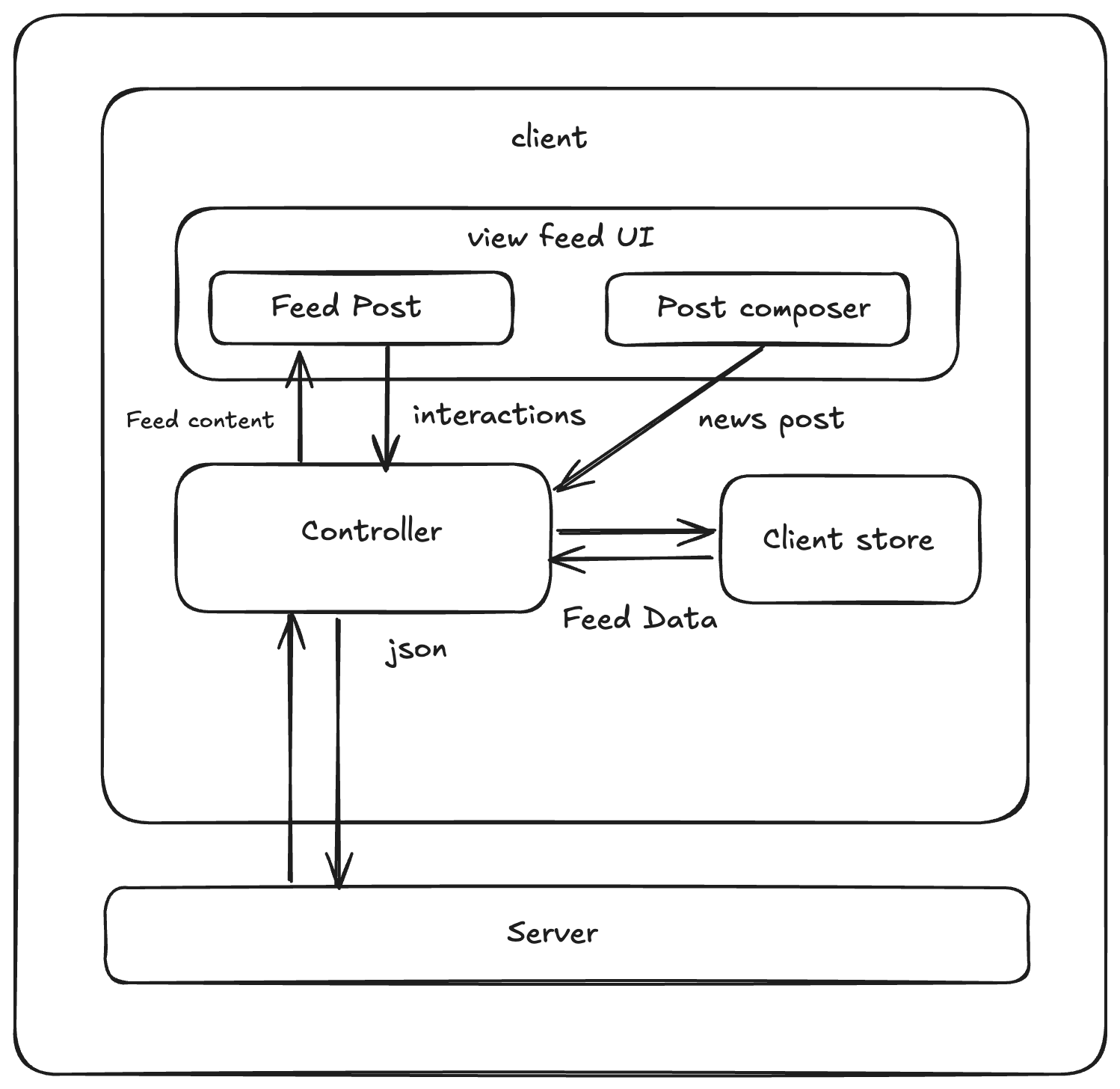 System Architecture Diagram
🧩 Component Responsibilities
- 🛰️ Server: HTTP APIs to fetch/create feed posts.
- 🎛️ Controller: Orchestrates data flow; makes network requests.
- 🗂️ Client store: Shared state (mostly server‑originated feed data).
- 📰 Feed UI: Renders list of posts and the composer.
- 💬 Feed posts: Shows post data with like/react/share controls.
- ✍️ Post composer: WYSIWYG editor for creating posts.
🖥️ Rendering Approach
- SSR: Great for static/SEO-heavy content (blogs/docs/e‑commerce).
- CSR: Best for highly interactive apps (dashboards/chat).
- Hybrid (SSR + hydration + CSR for subsequent loads): Ideal for news feeds—fast initial render, then rich interactions. React/Vue with Next.js/Nuxt support this pattern.
🗄️ Data Model
Most data is server‑originated; client-only state is mainly the composer form.
| Entity | Source | Belongs to | Fields |
|---|---|---|---|
| 📰 Feed | Server | Feed UI | posts (list of Posts), pagination metadata |
| 🧾 Post | Server | Feed post | id, created_time, content, author (User), reactions, image_url |
| 👤 User | Server | Client store | id, name, profile_photo_url |
| ✍️ NewPost | User input (Client) | Post composer UI | message, image |
All server data can live in the client store and be queried by components. When fetching additional pages, merge new posts into the existing list to present one continuous feed.
🏗️ Architecture / High-Level Design
- Hybrid SSR → hydrate → CSR for infinite scroll.
- Controller + store manage data fetching and cache normalization.
- Feed UI subscribes to store slices; composer writes into store and posts to server.
🧠 Advanced: Normalized Store
- Resembles a database: each data type has its own “table,” items have unique IDs, and relationships use IDs instead of nested objects.
- Facebook uses Relay (normalizes via GraphQL schema); Twitter uses Redux (see “Dissecting Twitter’s Redux Store”).
✅ Benefits
- Reduced duplication: Single source of truth (e.g., many posts share the same author).
- Easy global updates: If an author renames themselves, every post referencing that author updates instantly.
🤔 Why it’s often unnecessary for a basic feed interview
- Minimal duplicated data aside from user/author fields.
- News feeds are mostly read-heavy; interactions (likes) are scoped to a post.
- Upsides are limited without the broader feature set Facebook/Twitter have.
Further reading: “Making Instagram.com faster: Part 3 — cache first”
🔌 Interface Definition (API)
| Source | Destination | API type | Functionality |
|---|---|---|---|
| Server | Controller | HTTP | Fetch feed posts |
| Controller | Server | HTTP | Create new post |
| Controller | Feed UI | JavaScript | Pass feed posts data, reactions |
| Post composer | Controller | JavaScript | Pass new post data |
Most interesting: the HTTP API to fetch feed posts (pagination choices).
📡 Feed Fetch API (example)
| Field | Value |
|---|---|
| HTTP Method | GET |
| Path | /feed |
| Description | Fetches feed results for a user |
📑 Pagination Approaches
Two common strategies, each with pros/cons:
- Offset-based pagination
- Cursor-based pagination
🔢 Offset-based Pagination
Offset-based pagination involves using an offset to specify where to start retrieving data and a limit to specify the number of items to retrieve. It’s like saying, “Start from the 10th record and give me the next 5 items.” The offset can be an explicit number or derived from the requested page. Requesting page 3 with a page size of 5 translates to an offset of 10 because there are 2 pages before the 3rd page (2 × 5 = 10). It’s more common for an offset-based API to accept the page parameter and have the server convert it to an offset when querying the database.
Parameters
| Parameter | Type | Description |
|---|---|---|
| size | number | Number of items per page |
| page | number | Page number to fetch |
Given 20 items in a feed, { size: 5, page: 2 } returns items 6–10 plus pagination metadata:
{
  "pagination": {
    "size": 5,
    "page": 2,
    "total_pages": 4,
    "total": 20
  },
  "results": [
    {
      "id": "123",
      "author": {
        "id": "456",
        "name": "John Doe"
      },
      "content": "Hello world",
      "image": "https://www.example.com/feed-images.jpg",
      "reactions": {
        "likes": 20,
        "haha": 15
      },
      "created_time": 1620639583
    }
    // ... more posts
  ]
}
🔢 Offset-based Pagination: Details
SQL shape:
SELECT * FROM posts LIMIT 5 OFFSET 0; -- First page
SELECT * FROM posts LIMIT 5 OFFSET 5; -- Second page
✅ Offset-based pagination advantages
- Jump directly to a specific page.
- Total number of pages is easy to show.
- Simple backend math:
offset = (page - 1) * size. - Works across many databases; not tied to a specific storage engine.
⚠️ Offset-based pagination issues
- Inaccurate windows on fast-moving data: if new posts arrive between page fetches, page 2 can include items already seen on page 1, showing duplicates.
// Initial posts (newest on the left, oldest on the right)
Posts: A, B, C, D, E, F, G, H, I, J
       ^^^^^^^^^^^^^ Page 1 contains A - E

// New posts added over time
Posts: K, L, M, N, O, A, B, C, D, E, F, G, H, I, J
                      ^^^^^^^^^^^^^ Page 2 also contains A - E
⚠️ Client-side de-duplication is costly Clients can try to hide already-visible posts, but that requires custom logic and another fetch to fill the gap—extra network roundtrips. If items can also disappear, pages may end up missing records.
⚠️ Page size isn’t safely changeable
Because offset = (page - 1) * size, changing page size mid-stream can skip data:
| Page | Page size | Results |
|---|---|---|
| 1 | 5 | Items 1–5 |
| 2 | 5 | Items 6–10 |
| 2 | 7 | Items 8–14 |
⚠️ Performance degrades at large offsets
For huge offsets (e.g., OFFSET 1000000), the DB still scans and discards offset rows before returning the window—slow and costly.
Where offset works well Search results or catalogs where users jump to specific pages and data doesn’t mutate quickly (blogs, travel, e‑commerce).
🎯 Cursor-based Pagination (next step)
Cursor pagination uses a pointer to a specific record (id, timestamp, etc.) and asks, “Give me N items after this one,” avoiding the offset pitfalls. In SQL it resembles:
-- example pattern:
SELECT * FROM table WHERE id > cursor LIMIT 5.
🎯 Cursor-based Pagination
Parameters
| Parameter | Type | Description |
|---|---|---|
| size | number | Number of results per page |
| cursor | string | Identifier for the last item fetched; the query starts after this |
{
  "pagination": {
    "size": 10,
    "next_cursor": "=dXNlcjpVMEc5V0ZYTlo"
  },
  "results": [
    {
      "id": "123",
      "author": {
        "id": "456",
        "name": "John Doe"
      },
      "content": "Hello world",
      "image": "https://www.example.com/feed-images.jpg",
      "reactions": {
        "likes": 20,
        "haha": 15
      },
      "created_time": 1620639583
    }
    // ... More posts.
  ]
}
✅ Advantages
- More efficient on large datasets; uses indexed lookups instead of large offsets.
- Stable windows: new posts don’t shift earlier pages because the cursor is fixed—great for real-time feeds.
- Used by Facebook, Slack, Zendesk APIs.
⚠️ Downsides
- You can’t jump to an arbitrary page without walking cursors.
- Slightly more complex to implement.
- DB must map cursor → row uniquely (usually primary key or timestamp+id).
Which to choose for a news feed?
- Offset: simpler, fine for static/small datasets and when page jumping matters.
- Cursor: better for large, fast-changing, append-heavy feeds.
For infinite scroll where new posts arrive at the top and table size grows quickly, cursor-based pagination is superior.
Reference: “Evolving API Pagination at Slack”
✍️ Post Creation API
| Field | Value |
|---|---|
| HTTP Method | POST |
| Path | /posts |
| Description | Creates a new post |
Params: { body: '...', media: '...' } (shape varies by post type).
Response: commonly the created post (same shape as a feed item), or sometimes the latest feed slice.
{
  "id": "124",
  "author": {
    "id": "456",
    "name": "John Doe"
  },
  "content": "Hello world",
  "image": {
    "src": "https://www.example.com/feed-images.jpg",
    "alt": "An image alt" // Either user-provided, or generated on the server.
    // Other useful properties can be included too, such as dimensions.
  },
  "reactions": {
    "likes": 20,
    "haha": 15
  },
  "created_time": 1620639583
}
➕ Handling New Posts
- When a new post is created, prepend it to the start of the feed list in the client store.
🛠️ Optimizations & Deep Dive
Focus on each section of the feed separately:
- General optimizations
- Feed list optimizations
- Feed post optimizations
- Feed composer optimizations
🧰 General Optimizations
Code splitting for faster performance
- Split code by page (less relevant here—single-page feed).
- Lazy-load non‑critical code (modals, below‑the‑fold widgets, heavy deps).
Facebook’s 3-tier JS load:
- Basic layout + skeletons (above the fold)
- JS to fully render above-the-fold
- Post-display resources (logging, live updates)
Keyboard shortcuts
- Add feed-specific shortcuts (e.g.,
Shift + ?on facebook.com).
Error states
- Surface clear errors for network failures or offline mode.
📜 Feed List Optimizations
Infinite scrolling
- Trigger the next fetch before the user hits bottom (≈ one viewport height).
- Choose trigger based on network speed and scroll velocity.
Two ways to detect the trigger:
- Scroll listener (throttled) +
getBoundingClientRect - Preferred: Intersection Observer API (browser-optimized)
“Sites no longer need to do anything on the main thread to watch for element intersection.” — MDN, Intersection Observer API
Virtualized lists
- Render only items in/near the viewport; replace off-screen items with empty divs of equal height.
- Benefits: fewer DOM nodes to paint, lighter React reconciliation.
- Used by Facebook and Twitter.
Loading indicators
- For fast scrollers, show a shimmer/skeleton instead of a spinner during page fetch.
Dynamic loading count
- Initial load: overfetch cautiously (don’t know viewport yet).
- Subsequent loads: size requests based on viewport height.
Preserve scroll on remount
- Cache feed data + scroll position in the store; on return, rehydrate without a server round-trip.
Stale feeds
- If last fetch is hours old, prompt refresh or auto-refetch; optionally drop old feed from memory.
- Auto-appending new posts is possible but must avoid breaking scroll position.
🧩 Feed Post Optimizations
Deliver data-driven dependencies only when needed
- Many post formats (text, image, video, poll, etc.). Don’t preload every renderer.
- Lazy-load per format after data arrives to avoid unused JS; accept the extra fetch to keep initial payload small.
(Continue your feed-post details from here.)
// Sample GraphQL query to demonstrate data-driven dependencies.
... on Post {
  ... on TextPost {
    @module('TextComponent.js')
    contents
  }
  ... on ImagePost {
    @module('ImageComponent.js')
    image_data {
      alt
      dimensions
    }
  }
}
🧩 Data-Driven Component Loading (Facebook pattern)
A GraphQL response can include both data and the specific component chunk to render (e.g., TextComponent with text payload, ImageComponent with image payload). The client loads only what it needs per post, avoiding upfront loading of every post-format component.
Source: “Rebuilding our tech stack for the new Facebook.com.”
#️⃣ Rendering Mentions & Hashtags
Text isn’t just text—mentions and hashtags carry metadata. You need a format that preserves that metadata without locking you into unsafe or inflexible rendering.
1) HTML (🚫 not recommended)
<a href="...">#AboutLastNight</a> ... <a href="...">HBO Max</a>
Formats for Mentions & Hashtags
- HTML (not recommended)
- ✅ Simple to display
- ❌ XSS risk; hard to restyle; poor reuse on native clients
- Lightweight Custom Syntax (👍 pragmatic)
- Hashtags: treat any
#wordas a hashtag - Mentions:
[[#1234: HBO Max]](stores entity ID + display text) - Parse with regex → replace with styled links
- ✅ Small payload; easy to extend a bit
- ❌ You own parsing/escaping; limited if you later add richer entities
- Rich Text Editor Format (🏗️ robust) — Draft.js / Lexical style
- Editor state (AST-like) serialized to JSON; entities carry type + ranges
- ✅ Built-in parsing/rendering; easily extensible (mentions, hashtags, polls, etc.)
- ❌ Larger payloads; more complex; heavier to implement
Guideline:
- If you only need hashtags/mentions and want minimal weight → use custom syntax.
- If you need many rich entities and editor features → use Draft.js/Lexical-style rich text.
✍️ Draft.js-style representation (conceptual):
A post like “#AboutLastNight … HBO Max” serializes to editor-state JSON with entity ranges for the hashtag and the mention (Lexical uses a similar model).
{
  content: [
    {
      type: 'HASHTAG',
      content: '#AboutLastNight',
    },
    {
      type: 'TEXT',
      content: ' is here... and ready to change ... Dropping 2/10 on ',
    },
    {
      type: 'MENTION',
      content: 'HBO Max',
      entityID: 1234,
    },
    {
      type: 'TEXT',
      content: '!',
    },
  ];
}
🖼️ Rendering Images (Front-End Optimizations)
- 🌎 CDN: Serve images via CDN for faster delivery.
- 🆕 Modern formats: Prefer WebP/AVIF for better compression.
- 🧠 Alt text: Always set
alt. Facebook auto-generates via CV/ML; GenAI can do this too. - 📏 Screen-aware: Send viewport dims with feed requests so the server can size images appropriately; use
srcset/sizeswhen resizing is available. - 📶 Network-aware:
- Good/Wi‑Fi: prefetch just-out-of-view images.
- Poor network: show low‑res placeholders; load hi‑res on tap.
- ⏳ Lazy-load non-critical code: Reactions popover, overflow menus, etc., load during idle or on hover/click (Tier 3 assets).
⚡ Optimistic Updates
- Immediately reflect reactions/counts, assume success; on failure, rollback + toast.
- Built into modern data libs (Relay, SWR, React Query).
🕒 Timestamp Rendering
- Multilingual: Global apps must localize.
- Server returns raw timestamp → client formats (flexible, heavier JS for locale rules).
- Server returns translated string → lighter client, less flexible.
- Intl API: Use
Intl.DateTimeFormat/Intl.RelativeTimeFormatto localize in-browser with small footprint.
- Staleness: Relative times (“5 minutes ago”) should refresh periodically to stay accurate.
const date = new Date(Date.UTC(2021, 11, 20, 3, 23, 16, 738));
console.log(
  new Intl.DateTimeFormat('zh-CN', {
    dateStyle: 'full',
    timeStyle: 'long',
  }).format(date),
);

console.log(
  new Intl.RelativeTimeFormat('zh-CN', {
    dateStyle: 'full',
    timeStyle: 'long',
  }).format(-1, 'day'),
);
⏱️ Keep Relative Timestamps Fresh
- Relative labels (“3 minutes ago”) go stale on long-lived tabs.
- Refresh recent timestamps on a timer (e.g., update every 30–60s for items < 1h old).
🖼️ Icon Rendering Options
| Approach | Pros | Cons |
|---|---|---|
| Separate images | Simple | Many HTTP requests |
| Spritesheet | One request | More setup/coordination |
| Icon fonts | Scalable, crisp | Download whole font; FOUC risk |
| SVG files | Scalable, cacheable | Per-file requests; possible flicker |
| Inlined SVG (⚡ common) | Scalable; no extra requests | Not cacheable |
(Facebook/Twitter favor inline SVG.)
✂️ Post Truncation
- Collapse very long posts behind “See more.”
- Abbreviate large counts: Good: “John, Mary and 103K others” vs Bad: “John, Mary and 103,312 others.”
- Build the summary line on server or client, but don’t ship full user lists.
💬 Feed Comments (apply same patterns as posts)
- Pagination: cursor-based for comment lists.
- Draft/edit: same rich-text approach as posts.
- Lazy-load emoji/sticker pickers.
- Optimistic updates: append new comment, bump reaction counts immediately.
Live updates options: short polling, long polling, SSE, WebSockets (Facebook uses WebSockets), HTTP/2 push (rare).
- Subscribe/unsubscribe based on visibility to avoid wasted updates.
- Throttle/debounce updates for high-fanout posts; sometimes only refresh counts.
✍️ Feed Composer Optimizations
- Rich text for hashtags/mentions: use a battle-tested editor (Lexical, TipTap, Slate; Draft.js is legacy).
- Avoid raw
contenteditablewithout a library (bugs/cross-browser quirks). - Lazy-load non-core features: image/GIF/emoji/sticker pickers, backgrounds.
🔒 Accessibility Checklist
- Feed container:
role="feed". - Each post:
role="article",aria-labelledby="<author-id>". - Ensure post contents are keyboard-focusable (
tabindex="0"where needed). - Icon-only buttons need
aria-label. - Provide keyboard path to reaction menus (e.g., focus reveals trigger similar to hover).
Links
- Rebuilding our tech stack for the new Facebook.com(Reference)
- Making Facebook.com accessible to as many people as possible(Reference)
- How we built Twitter Lite(Reference)
- Building the new Twitter.com(Reference)
- Dissecting Twitter's Redux Store(Reference)
- Twitter Lite and High Performance React Progressive Web Apps at Scale(Reference)
- Making Instagram.com faster: Part 1(Reference)
- Making Instagram.com faster: Part 2